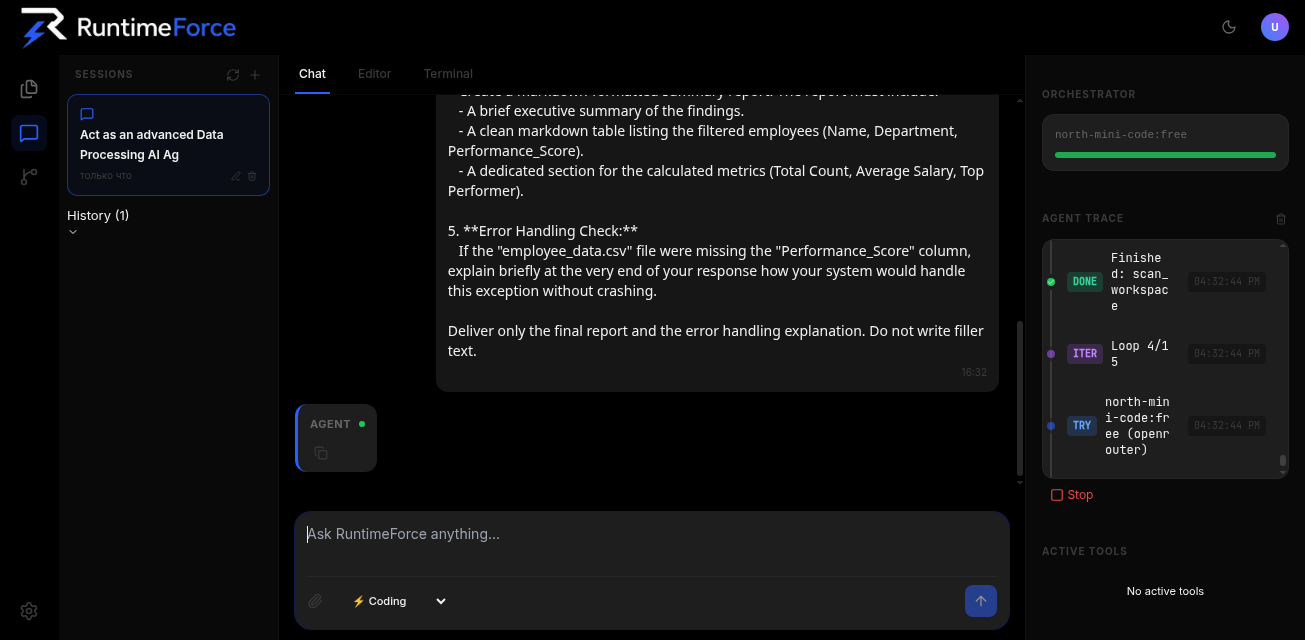
Forget chat bots giving "copy this code" advice. RuntimeForce is an autonomous development environment for local machines and remote SSH servers with multi-model orchestration, eternal graph memory, and zero source code leakage.
Native CLI for developers. No Electron bloat, no cloud sync, no telemetry. One command to run on localhost.
localhost:8000
Built for real development workflows, not just chat. Your code stays local, your keys stay encrypted, your context never fades.
Not a single line of private code is sent to third-party servers for model training. The local client runs on your PC or private server and keeps all keys under AES-256 encryption.
Connect a free Groq or Cerebras API key and get responses at 1000+ tokens per second. Terminal commands, refactoring, and codebase search execute almost instantly.
Thanks to the Graph Memory Engine, the IDE remembers your architectural decisions, file structure, and dependencies even in projects with hundreds of thousands of lines of code.
Develop locally or connect a dev server via SSH in one click. The agent installs dependencies, checks Git status, applies edits, and runs tests autonomously.
You don't pick a model — you pick a strategy. The orchestrator routes tasks to the best model automatically based on speed, cost, and complexity.
Groq (LPU) & Cerebras — 500–1000+ tokens/sec for instant analysis and console operations.
Google Gemini — context up to 1–2M tokens for repository analysis, logs, and architecture review.
Ollama & LM Studio — work with sensitive code completely offline without internet.
Claude 3.5 Sonnet, GPT-4o, DeepSeek, Grok — available in Pro/Studio tiers for complex reasoning tasks.
When a provider fails (429 Rate Limit, Quota Exceeded), the orchestrator switches to the next model in rotation within milliseconds — without interrupting generation or losing context.
From quick fixes to full autonomous development — choose the mode that fits your workflow.
Orchestrator analyzes task complexity and picks the ideal model by Quality → Price → Speed matrix. Instant model switching on failures.
Multi-agent engineering pipeline: Architect plans, Engineer codes, Tester runs tests, Critic validates. Full-cycle autonomous development.
100% offline. Strictly filters to local engines (Ollama, LM Studio). Code never leaves your machine. Zero cost, maximum privacy.
Fix your chosen model with intelligent fallback on unavailability. Full control for experienced users.
Turn commits into viral posts automatically. The AI agent packages your changelog into human-readable posts for X.com and Reddit subreddits (`r/SideProject`, `r/buildinpublic`, `r/programming`). One click publishes to multiple platforms and creates GitHub Release simultaneously.
Dangerous commands are intercepted with a flexible confirmation system. Your infrastructure stays safe.
Destructive operations (`rm -rf`, `chmod 777`, `git reset --hard`, `apt install`) trigger an interactive modal window with flexible confirmation:
Superuser password entry in an isolated memory window for executing sudo commands without writing passwords to logs or disk.
Everything you need to know about RuntimeForce.
Unlike cloud-based editors or chat bots, RuntimeForce focuses on the full development runtime: terminal, local OS, remote SSH servers, and multi-model orchestration while maintaining complete data sovereignty. Your code never leaves your machine.
Yes. The Free tier is fully functional: you can connect free API keys from Groq, Google Gemini, Cerebras, SambaNova, or run offline models via Ollama with zero AI costs. 90% of tasks are solved using free models.
They are encrypted with AES-256-GCM and stored in your local SQLite database (runtime.db). The server-side RuntimeForce never has access to your servers or files — it only handles billing, authentication, and license validation.
For cloud models (Groq, Gemini, Claude), yes. For local models (Ollama, LM Studio), no — you can work 100% offline. Pro/Studio users get a 48-hour Offline Grace Period to continue working without server connectivity.
RuntimeForce supports Windows (PowerShell), macOS, and Linux (Ubuntu/Debian/Arch). The local client runs as a native CLI application and opens a dashboard in your default browser at localhost:8000.
Install in one command. Start building with AI that actually works on your code.